Why I chose a static site generator to serve content for this blog
Contents
For my first post it feels fitting to explain a decision I made before writing a single word of content: serving this blog from a static site generator instead of a Content Management System (CMS) such as the well-known WordPress, which powers roughly 65% of all sites that use a CMS at the time of writing.
A CMS like WordPress is powerful, but for a personal blog it brings along a database, a server-side runtime and a plugin ecosystem that I simply don’t need. A static site generator takes my content, renders every page ahead of time, and hands me a folder of plain HTML, CSS and JavaScript that can be served from anywhere.
The advantages that convinced me are:
- Security
- Performance
- Maintenance
- Manageability
- Scale
Security
The pages are rendered in advance instead of on the spot when a visitor opens the site. Because there is no database to query and no server-side code running per request, the attack surface is tiny. There is no login form to brute-force, no SQL to inject and no vulnerable plugin to exploit — the server just hands out static files.
Performance
Since the whole site is generated ahead of time, every page is ready to serve immediately; there is no response to compile on demand. The build itself takes milliseconds, and pages arrive in the visitor’s browser noticeably faster.
The diagrams below — from Google’s Rendering on the Web — illustrate why. With traditional server rendering the browser has to wait for the server to build the response before anything appears:
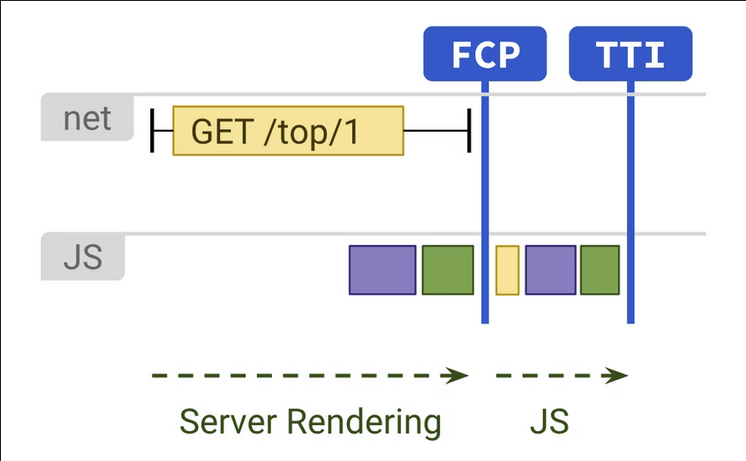
(Server rendering, taken from Google [1])
With static rendering the HTML is already there, so the First Contentful Paint (FCP) happens sooner and the JavaScript becomes optional rather than blocking, bringing Time To Interactive (TTI) forward as well:
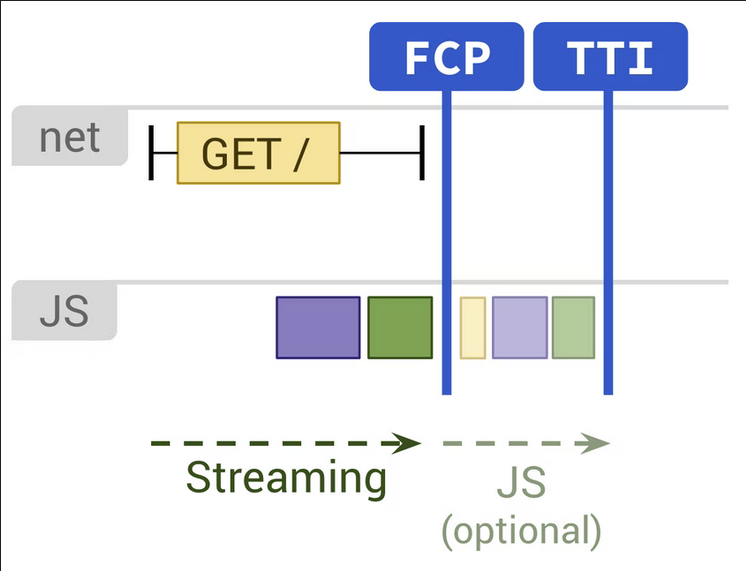
(Static rendering, taken from Google [1])
Maintenance
There are no security updates to chase and no pop-ups nagging me to update a CMS and its plugins. I don’t run a database or a backend that I have to keep patched, backed up and reliable. The site is just files, and files don’t need babysitting.
Manageability
With a static site generator I manage my content as code. Posts are written in
Markdown (.md files) and generated into static pages, which means the whole
site lives happily in version control.
I also don’t like the idea of locking my work inside the walled garden of a tech
giant. Markdown is a universal, plain-text format supported by countless tools.
I can convert a post to a .pdf, feed it into something else, or migrate the
entire blog to a different static site generator with little effort.
Scale
Because every page is generated ahead of time, the public content can be pushed to a Content Delivery Network (CDN). Instead of files being delivered from a single origin server, they are distributed to servers around the globe and served from the location closest to each visitor. Scaling from ten readers to ten thousand mostly comes down to the CDN doing its job.
Challenges
Going static isn’t free of trade-offs. A few things that a CMS gives you out of the box need a deliberate solution.
A commenting system for visitors
One of the first questions was how to let visitors interact — with me and with each other — without the built-in comment function a traditional CMS provides. Comments are dynamic by nature, so adding them to a static site means reaching for a third-party integration and effectively turning the site into a hybrid.
I considered Disqus, the popular hosted commenting system that drops into most static site themes with almost no effort. In the end I decided against it: it pulls in a lot of third-party JavaScript and trackers, which works against the privacy and performance reasons I chose a static site for in the first place. For now the blog runs without comments, and I’d rather add a privacy-respecting solution later than compromise on that today.
Privacy-friendly analytics
I did want some insight into which pages people read and how they find the site, without spying on my readers. I looked into Plausible but found articles describing how a custom domain is used to slip past ad-blockers, which I wasn’t comfortable with.
My criteria were:
- Less than €10/month
- Ignores localhost visits, for when I’m working on the Hugo code locally
- Respects the Do Not Track header and can be blocked by ad-blockers
- Easy to integrate with Hugo
- Multiple ways of collecting data
I settled on GoatCounter: an easy-to-integrate, open-source analytics platform that positions itself as a privacy-friendly alternative to Google Analytics and Matomo. To my surprise it offers several integration options, including parsing server log files, so it doesn’t even have to rely on a tracking script in the browser.
Components
- Hugo — A popular open-source static site generator written in Go. It ships as a single cross-platform binary, and the site it produces can be hosted anywhere, self-hosted or on a global CDN.
- GoatCounter — Privacy-friendly, open-source web analytics.
- Pagefind provides the search. It indexes the generated HTML at build time, so the whole blog is searchable with no server or database involved.
- CDN — A Content Delivery Network for faster delivery of pages and images. It optimises loading times for international visitors and reduces load on the origin server.
Considered but not used
- Disqus — A hosted third-party commenting system. Trivial to integrate, but rejected for the privacy and performance reasons described above.
Author Thomas Brinkman
LastMod 2021-11-28